Taking attendance is what gives life to Domo's pastoral follow-up: from who attends (and who doesn't), Domo helps you know who to walk alongside. And it's very fast.
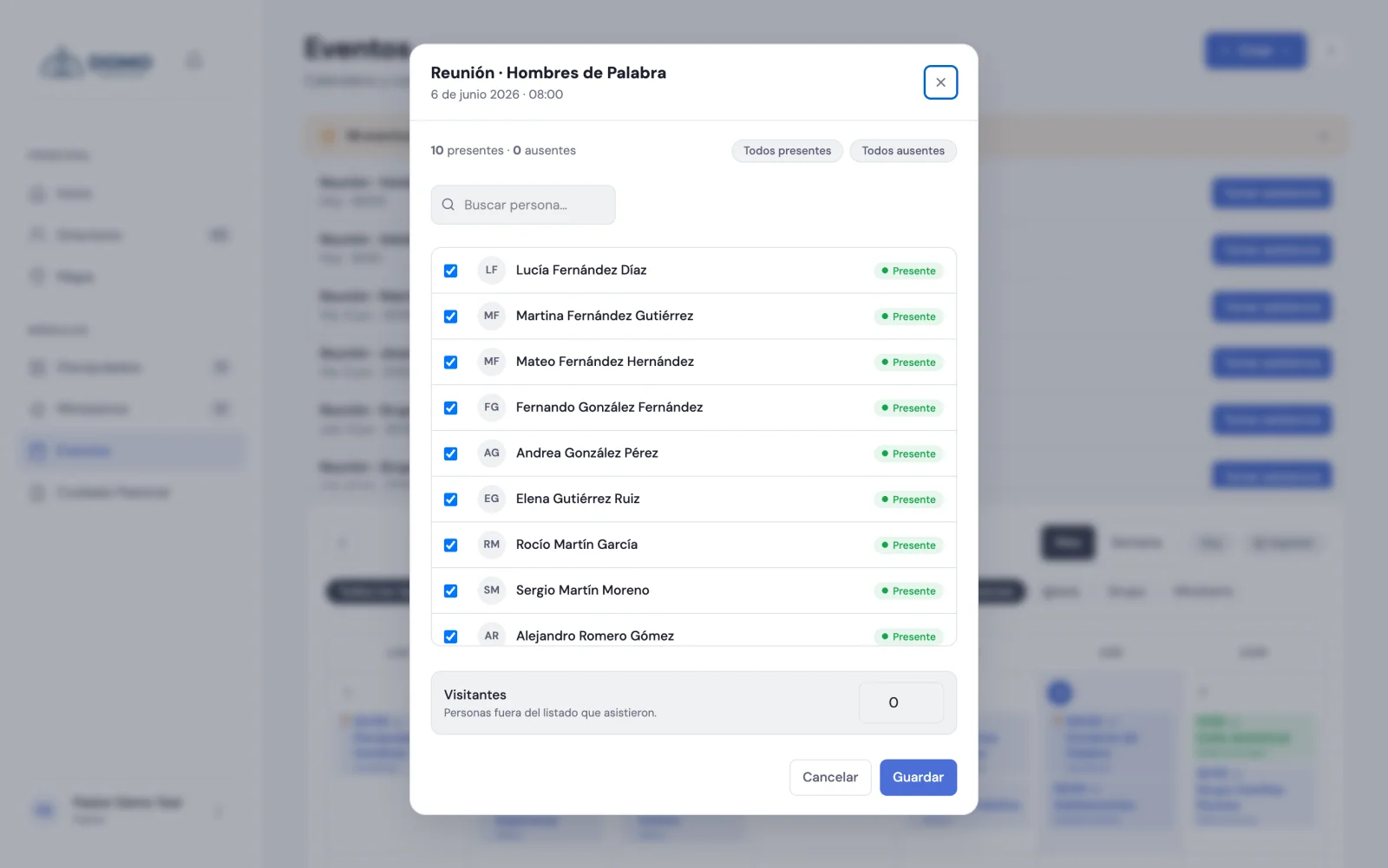
Record an event's attendance
- Open the event that requires attendance. You can do it from the Events calendar or from the pending events notice at the top.
- Click Take attendance.
- The list of people opens. Everyone shows as present by default: just uncheck those who were absent.
- If you need to, use All present or All absent to start from scratch, and the search box to find someone quickly.
- If there were visitors, note how many.
- Click Save.
Done. The event is marked as held and the absences are recorded.
To take attendance you need the matching permission. The Pastor and Resident have it, and so do leaders over their own groups.
Attendance in groups
In your Discipleships you can also take attendance: each group has its Take attendance button, made for the leader to record who came to the meeting.
Something important
Domo has no self check-in (a person doesn't sign themselves in): a leader or someone on the team always takes attendance. That way the data stays in the care of whoever walks with the group.
Next step
Once you take attendance regularly, Domo starts telling you who to follow up with. We cover it next.